
If you have multiple TVs at home and want to run them using a single dish antenna, the good news is—you can do it بسهولة and cost-effectively. No need to install multiple dishes or complicated wiring setups.
The Simple Solution
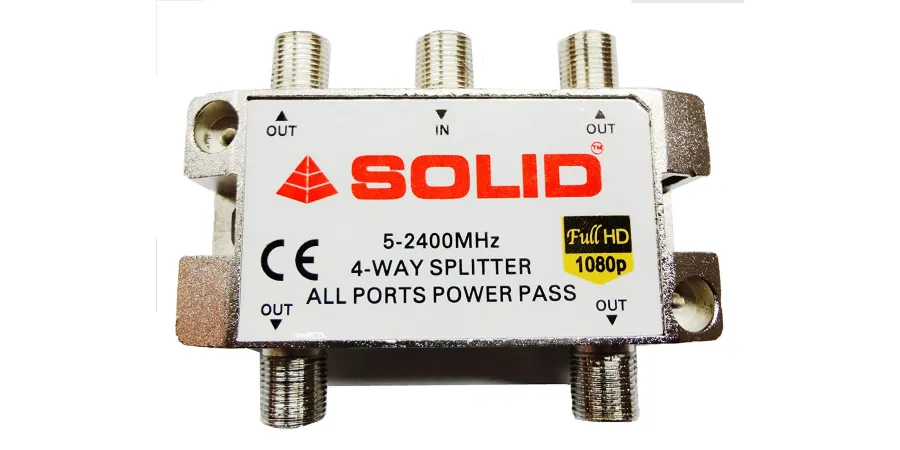
You can connect up to 4 set-top boxes from a single dish antenna by using a 4-way splitter, like the SOLID 4-Way Splitter (5-2400MHz).
Step-by-Step Setup:-
1. Connect the Dish Cable to Splitter
Take the main cable coming from your dish antenna (LNB output) and connect it to the IN port of the 4-way splitter.
2. Connect Set-Top Boxes
Use separate coaxial cables to connect each OUT port of the splitter to each set-top box.
3. Power On Devices
Turn on all your TVs and set-top boxes.
4. .Scan Channels
Perform channel scanning on each set-top box to start watching your favorite channels.
Why Use SOLID 4-Way Splitter?
1. Supports 5–2400MHz frequency range
2. All ports power pass for stable signal
3. Compatible with Full HD (1080p)
4. Strong, durable metal body
5. Reliable signal distribution to all TVs
Conclusion
Using a SOLID 4-Way Splitter, you can easily connect 4 set-top boxes to a single dish antenna without extra installation costs. It’s a smart and efficient solution for homes, shops, or offices.