
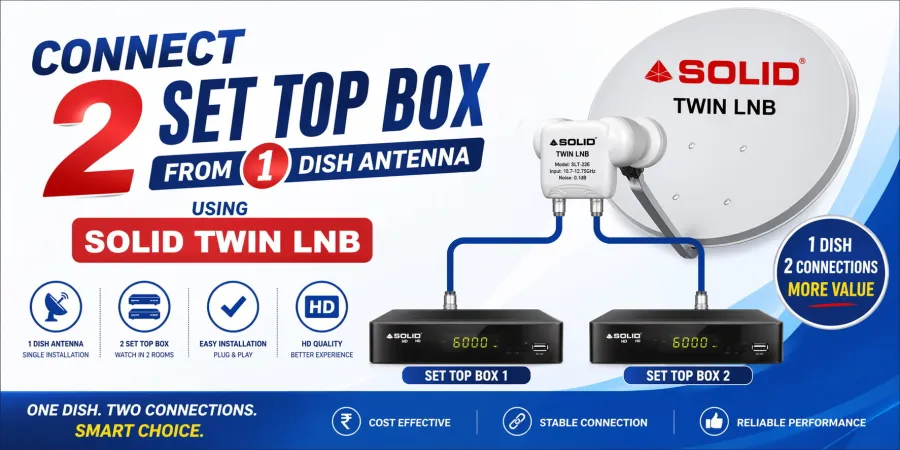
Watching TV in multiple rooms doesn’t mean you need multiple dish antennas. With the right setup, you can easily connect 2 set-top boxes to a single dish antenna and enjoy uninterrupted entertainment.
The Smart Solution: Use a Solid Twin LNB
The easiest and most effective way to connect two set-top boxes is by using a Solid Twin LNB. Unlike a standard LNB (which supports only one connection), a Twin LNB comes with two output ports, allowing you to run two separate cables to two different set-top boxes.
How It Works*
Follow these simple steps:-
1. Install a Solid Twin LNB on your dish antenna
2. Connect two coaxial cables to the LNB outputs
3. Run each cable to separate set-top boxes
4. Connect cables to each STB and power them on
5. Scan channels on both boxes independently
Key Benefits
1. Watch different channels on both TVs simultaneously
2. No need for extra dish antennas
3. Stable and uninterrupted signal quality
4. Perfect for homes, offices, and shops
5. Supported Solid Models
You can use the following Solid Twin LNB models:
FS-222 Pro
FS-108
FS-255
FS-336
FS-336 Pro
FS-36 Eco
FS-507
Conclusion
Connecting two set-top boxes from one dish antenna is simple and cost-effective with a Solid Twin LNB. It gives you flexibility, better performance, and eliminates the need for multiple dish setups.
Upgrade your setup today and enjoy seamless TV viewing on multiple screens!